No Private Key, No Problem. How to Decrypt SSL/TLS traffic with Session Keys.
The easiest way to decrypt data is to use the private key for the corresponding public key. However, there may be situations where you do not have access to the private key but still need to decrypt SSL/TLS traffic. This post will walk through how to use the pre-master secret method to decrypt SSL/TLS traffic in Wireshark.
Step 1
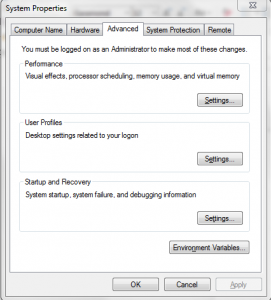
Access the system properties by right-clicking “My Computer,” selecting Properties, then Advanced System Settings, and opening the Advanced Tab to access Environment Variables.
Step 2
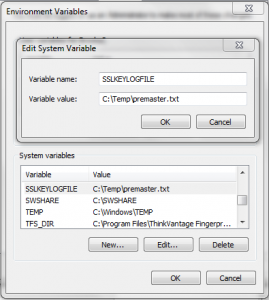
Create a new System variable named SSLKEYLOGFILE with a file path ending in premaster.txt as the variable value.
Step 3
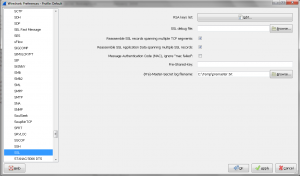
Configure Wireshark to use the premaster file by navigating to Edit > Preferences > Protocols > SSL and setting the (Pre)-Master-Secret log filename to the path of your premaster.txt file.
Important: Internet Explorer will not work for decrypting data using this method. You must use Firefox or Chrome.
Step 4
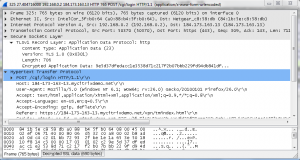
Any new network traces taken through Wireshark while navigating SSL/TLS encrypted sites that leverage a premaster secret and RSA will now be decrypted. This method is also useful when working with traces from NetScaler appliances, as you can decrypt traffic for specific clients using the SSLKEYLOGFILE environment variable without needing to distribute private keys.
I have to give credit to the article at root9.net that inspired this guide.
Happy Decrypting! BC