Thursday, January 18, 2024

Considerations on MSS when using a GRE tunnel from a CDN to a CDN origin


When a GRE (Generic Routing Encapsulation) tunnel is used between the CDN and the CDN origin, it can impact the Maximum Segment Size (MSS) of the TCP connections due to the additional overhead introduced by the GRE encapsulation. Here's how it works:

GRE Tunnel Overhead

  • GRE encapsulation adds additional headers to the packets being transmitted. A GRE header typically adds 24 bytes (20 bytes for the GRE header and 4 bytes for the GRE key, if used).
  • This extra overhead reduces the amount of space available in each packet for the actual payload data.

Impact on MSS

  • The MSS in a TCP connection signifies the largest amount of data, in bytes, that a computer or communications device can receive in a single TCP segment. It does not include the TCP header or IP header.
  • Under normal circumstances without a GRE tunnel, the MSS is calculated based on the Maximum Transmission Unit (MTU) of the network path, typically 1500 bytes for Ethernet networks. From this, the IP header (20 bytes) and TCP header (typically 20 bytes) are subtracted, resulting in a default MSS of 1460 bytes.
  • With a GRE tunnel, the additional GRE header needs to be accounted for. If the network path's MTU remains at 1500 bytes, the MSS must be reduced accordingly to accommodate the GRE header. For example, with a 24-byte GRE header, the MSS would need to be reduced to 1436 bytes (1500 - 20 for IP header - 20 for TCP header - 24 for GRE header).

Consequences

  1. Fragmentation:

    • If the MSS is not adjusted for the GRE overhead, packets might exceed the MTU, leading to fragmentation. Fragmentation can reduce performance and increase the likelihood of packet loss.
  2. Reduced Efficiency:

    • A smaller MSS means that more packets are required to send the same amount of data. This can lead to increased overhead and reduced efficiency in data transmission.
  3. TCP Performance:

    • TCP performance might be impacted due to the reduced MSS. TCP throughput can be less efficient with smaller packet sizes, especially over long-distance links where latency is a factor.

Adjusting MSS

  • Network administrators can adjust the MSS using TCP MSS clamping, a technique used in routers and firewalls to modify the MSS value within the TCP SYN packets. This ensures that the end devices establish connections using an MSS that takes into account the GRE overhead, preventing issues like fragmentation.

In summary, using a GRE tunnel between the CDN and CDN origin impacts the MSS due to the additional header overhead of the GRE encapsulation. This necessitates an adjustment of the MSS to avoid fragmentation and maintain efficient TCP performance. Proper network configuration, including MSS clamping, is essential to handle this change effectively.

Saturday, July 2, 2022

Staying logged into a web site when using puppeteer

Do you want to stay logged into a site after manually logging in with puppeteer?

This task is not as easy as just specifying the user data directory based on feedback from the following Github thread.

https://github.com/puppeteer/puppeteer/issues/921

The work around is to save cookies after logging in and then load those cookies in subsequent sessions. Here is the answer from Github.

https://stackoverflow.com/questions/56514877/how-to-save-cookies-and-load-it-in-another-puppeteer-session#56515357


Saturday, June 25, 2022

What is trust in cyber security?

What is trust? The philosophy of trust is fascinating. The definition of trust is "Assured reliance on the character, ability, strength, or truth of someone or something".

Where does the trustor's belief come from? My point of view is that the trustor must have a past experience or foundational belief on behalf of the trustor to inform the level of trust or distrust the trustor will have in the trustee. Without some prior knowledge to an interaction, there is likely to be no foundation for trust or distrust. Every adult human on the face of the earth will have a weighted perspective on how much they believe a trustee will act in a way that is beneficial to the trustor.

So far this post has been a very philosophical discussion. Why am I even talking about the concept of trust? In information security, trust is the bedrock for nearly interaction (or at least it should). When a person attempts to redeem a gift card online, the web application owner assumes that if valid card details are entered, then that must be the owner of the gift card. The online shop will then add the balance of the gift card to the person's account. It would be amazing if the world was this simple, but online fraudsters will take advantage of this inherent trust. Fraudsters can brute force gift card validation endpoints using automation (aka bots) to redeem balances on gift cards.

How can a website owner distinguish between legitimate users and fraudsters for these cases?

There are a number of identifiers that are available with a given request including:

  • Source of the traffic. (IP and Geo IP)
  • Owner of the source traffic. IP ASN Owner and OrgName.
  • HTTP request headers
  • Rate of traffic

This is not an exhaustive list and there are many sub categories of these different fields that could be utilized as well. This is especially true with rate of traffic. If there are a million requests being sent within a 5 minute time frame from a single user, then that would likely be considered abusive or fraudulent by most web applications. These 5 million requests would not be considered trustworthy since it vastly exceeds the normal user usage. However, there are applications where this may be acceptable behavior. What qualifies as "normal" requires some prior knowledge or definition to define what "normal" really is.

We cannot infer trust in a vacuum. We must rely on prior knowledge to guide if something or someone is trustworthy. As we continue to progress in cyber security to fight fraud, it will be interesting to see how an individual's history is recorded for good or bad behavior.

Here are some questions that I have for maybe a later post.

If my online persona violates the ToS for a site, then does that get recorded somewhere? Should it? When should it be a requirement for my real or true identity to be used for interacting with a site instead of having the ability to use a persona?

Monday, December 20, 2021

Risk of incorrectly classifying people as bots

I really like two different shows. The Netflix show Black Mirror illustrates various dystopian futures and Reply All is usually an upbeat show that reports on a wide spectrum of topics.

Recently Reply All put out the show State of Panic where the critics of a Florida politician were the recipients of varying degrees of unwanted attention to put it lightly. The large volume of unwanted attention came in the form of undesirable direct messages (DMs) and tweets directed at the critic. The large volume of messages had very focused messaging which could give the impression that the communication was being driven by a small set of individuals with a large number of bot operator managed Twitter accounts. However, after doing some investigation by the good folks at Reply All, it was identified that there were actually a number of very zealous Twitter followers of the politician. The Florida politician, while having some controversial beliefs, had deeply connected with many people online.

Below is the short synopsis the Men on Fire episode of Black Mirror from Wikipedia.

The episode follows Stripe (Malachi Kirby), a soldier who hunts humanoid mutants known as roaches. After a malfunctioning of his MASS, a neural implant, he discovers that these "roaches" are ordinary human beings. In a fateful confrontation with the psychologist Arquette (Michael Kelly), Stripe learns that the MASS alters his perception of reality.

For the soldier, it is much easier to eliminate the "roaches" than to eliminate real people. Once the soldier becomes aware that his actions are impacting people instead of "roaches", he starts to empathize and question his overall mission. In the case for Reply All's State of Panic episode, recipient of the harassment viewed the messages as originating from bot managed accounts since it was difficult to believe that so many real people would have the specific set of beliefs. While harassment is certainly not helpful, we still have to acknowledge that these are real people's voices. When we incorrectly classify public web discourse as bot traffic, we are minimizing the view points of those individuals. The view points may be misguided or factually incorrect, but they still are the perspectives of those people. 

Large numbers of fake accounts that are managed by a small set of individuals can absolutely be a problem. Platforms should take steps to reduce the influence of fake accounts where possible. However, we should also avoid the knee jerk reaction of classifying controversial opinions as originating from "bots". Otherwise, we will not understanding the view points of a large population of individuals.

Monday, August 30, 2021

E-commerce Bot Economics


What does supply and demand have to do with bots?

For this post, I am not talking about bots that are performing attacks such as SQLi or Account Takeover (ATO). This post will strictly explore the grey area of web scrapping and cart checkout based bots. For folks that have studied economics, you are likely familiar with tried and true supply and demand curve. A quick refresher can be found on wikipedia, https://en.wikipedia.org/wiki/Supply_and_demand

Xbox and PS5 bots

There are a number of tools that exist for going through a checkout process to buy products. The bot operators typically fall into a few different buckets:

The motivation for an organization to buy thousands or even hundreds of thousands of PS5s is because... drumroll.... MONEY! There is an enormous opportunity to buy low and sell high for this highly sought after product.

Into the economics

There is a substantial delta between what customers are willing to pay for a product and what the product is initial sold for. In a free marketplace, the high demand would be signal to charge more to customers for the product. Charging a higher sticker price allows demand to go down to meet supply and ultimately result in higher profits for a business. More importantly, this removes the profit margin that can exists in secondary markets. A bot management solution can be a helpful tool for raising the barrier to entry for a bot operator. However, if there is enough of a margin between the price of the product that the primary seller and the price that the end consumer is willing to pay, then bot operators will find a way around any bot management solution. The ultimate solution is to close the gap between the primary market and any secondary or end consumer tooling markets.
Primary market sellers cannot always raise prices

There are a number of marketplaces where the primary sellers cannot raise prices. For example, with ticketing platforms the ticket prices are often set by the artists that will be performing. This results in many artists that will set ticket prices substantially below market value with the hope that "real fans" will be able to buy the tickets. When scalpers purchase the tickets and then sell them at the actual market value, then the fans get frustrated with the ticket selling vendor. The bot operators then resell the tickets at a market rate on a secondary market with a healthy profit. The artists are then able to deflect any criticism about ticket prices onto the ticket selling vendor for not implementing sufficient ticket scalping measures.

What is the solution?

The real solution to this problem is an economics solution. There are 2 options. Either increase supply or reduce demand. To continue with the venue ticketing example, increasing supply is a simple concept. If artists do substantially more shows so that more seats are available, then supply goes up. This is a simple concept, but not easy or desirable to implement since it requires much more work for the artists and supporting staff for less of a return. This is the approach that Kid Rock took. I would encourage everyone to listen to this podcast for details on that use-case, https://www.npr.org/transcripts/671583061. The other approach is to reduce demand, which is also an easy concept. Taylor Swift did by raising her ticket prices. The following link contains those details, https://econlife.com/2019/12/higher-concert-ticket-prices/.

These solutions are great if the seller has the ability and will to make these changes, but often the seller has a deficit in one of these areas. As a consequence, sellers are forced to examine how to increase the barriers to entry to make it less profitable for secondary markets to operate. An effective bot management solution and identity management solution can be a critical piece in increasing the costs for secondary markets. However, if the gap between the price customers are willing to pay and the available supply remains wide, then secondary markets will remain profitable.
Where can this mindset be applied?

I would argue that the true customer for companies that sell products at below market value is the supplier. The initial sellers need the ability to charge more for these high demand products, or they will be forced to add more friction in the buying process to try to combat the secondary market. This economics approach may be considered for really any highly sought after product. This includes physical products like shoes (sneaker bots), baby cloths, GPUs, airline tickets, and PS5. 

Bot Operator Tooling

The tooling that is used to buy the product from the primary marketplace can vary from basic scripts using items like the following:

  •     Browser plug-ins
  •     Python Requests and Beautiful Soup
  •     Selenium
  •     Anti-captcha solutions to defeat captchas
  •     Residential and mobile network proxies


Appendix

Tuesday, December 8, 2020

Why is referrer missing in Google Analytics?

Learn from my mistakes and save some time. I spent way more time on this than needed. If your referrer is missing from you Google Analytics and you use Google Tag Manager, then make sure you set the field alwaysSendReferrer to true per the screenshot below.


This field is necessary to always send the referrer as the dr parameter in web requests to Google Analytics. For more information on the referrer, see the following link.

https://developers.google.com/analytics/devguides/collection/analyticsjs/field-reference#referrer 

Have a great day!

Brooks

Monday, September 28, 2020

Chromedriver really wants to use the default profile

Today I learned that when using chromedriver and trying to use an existing Chrome Profile that the existing Selenium or chromedriver package will attempt do one of the following:

1. If "default" exists, then that directory will be used
2. Selenium will create a "Default" directory unless a profile directory is specified.

Take for example the following snippet:

from selenium import webdriver 
chromeOptions = webdriver.ChromeOptions()
chromeOptions.add_argument("--user-data-dir=/Users/myuser/Library/Application Support/Google/Chrome/Profile 2")

browser = webdriver.Chrome(options=chromeOptions)

browser.get('https://brookscunningham.com/')
return browser

 The first time you would run the above, it will not work. However, I did see that the new directory "/Users/myuser/Library/Application Support/Google/Chrome/Profile 2/default" did exist with all of the expected chrome settings of a brand new chrome profile. To make my profile work with Selenium, I needed to make a small update.

from selenium import webdriver 
chromeOptions = webdriver.ChromeOptions()
chromeOptions.add_argument("--user-data-dir=/Users/myuser/Library/Application Support/Google/Chrome/")
chromeOptions.add_argument("--profile-directory=Profile 2")

browser = webdriver.Chrome(options=chromeOptions)

browser.get('https://brookscunningham.com/')
return browser

I had to specify the specific profile directory name using the "--profile-directory" argument. The correct profile starting working after I made the change. 

Happy automating!

Sunday, February 23, 2020

Why consistent tooling matters

I have always known that there is a lot of tribal knowledge within the team that I am a part of. I also understand that the silo'ed knowledge is undesirable, but until recently I did not really see the extent where this can be problematic. We become too comfortable with going through inefficient workflows to solve problems because that is what we are used to. Tooling could be built to make the workflows more efficient, but the cost in time to build out the tools compared to going through the sub-optimal workflows was not worth paying in the moment. It was much easier to just train people on the nuance of how the systems worked and then demonstrate the sub-optimal way to complete the task. However, this methodology fell apart and was not scalable as it became necessary to aggressively on-board new engineers.

Once it became a requirement to on-board product support engineers to the product that I was helping maintain, I was essentially starting from the ground up with a bunch of new hires for a geographically dispersed team. The existing product support team members are tech savvy, but the technology that I had been supporting works very different from anything that they had worked with previously. As I was doing some of the training and explaining how to troubleshoot cases I would often get the question "How do you know to look at x system when y problem happens?". I was really bothered by these types of questions because these were largely undocumented Product quirks that the the existing Support team and myself would stumble upon and remember the pain of troubleshooting the low level mechanics of what could be causing x issue.

It is important for team members to all to use the same methodology when troubleshoot similar cases. The lack of tooling created a per-requisite to understand the low level details of systems before they could even begin to understand the approach to solving technical issues. Without consistent tooling there was a wide variety of process and methodology for solving cases. Everyone was left to their own devices to figure out the what they could see as the best way to solve cases. Useful tooling does a few things:
  1. Provides mechanisms for troubleshooting specific issue
  2. Provides a shared language for how issues have been troubleshot and what troubleshooting to do next.
  3. Reduces on-boarding time
I will go through each of the 3 items above since they require their own more in-depth explanation.

Provides mechanisms for troubleshooting specific issue

PKI is very large topic with many complex pieces. It is a common task for Support Engineers to check the validity of a certificate. My preferred way of checking the validity of a certificate is to use tooling in Openssl. Below is the function for reference:


function checkcert {
echo "---------------------------"
echo "Certificate Valid Dates"
echo "---------------------------"
true | openssl s_client -connect $1:443 2>/dev/null | openssl x509 -noout -dates
echo "---------------------------"
echo "Certificate CN and DNS Info"
echo "---------------------------"
true | openssl s_client -connect $1:443 2>/dev/null | openssl x509 -noout -text | grep DNS:
echo "Issuer"
echo "---------------------------"
true | openssl s_client -connect $1:443 2>/dev/null | openssl x509 -noout -issuer
echo "---------------------------"
echo "Check Hostname Validity"
echo "---------------------------"
true | openssl s_client -connect $1:443 2>/dev/null | grep 'Verify return code'
}


If a support engineer has to validate a certificate, then it is as easy as running checkcert foo.bar from the command line to check the validity. I am assuming that SNI is not a factor for this example. There is no need to open a browser to grab a screenshot of text. The output of the command already provides the most relevant information for identifying the validity of a certificate in an easy to consume and share format. Having information formatted in a way that is easy to consume is a critical part to the next point.

Provides a shared language

IT systems are complex and the roles between organizations are highly specialized. Having a clear and consistent way of communicating between people will result in issues being fixed more quickly. Using similar tooling builds trust and confidence when transitioning work items from individual to another in a team. Also, there is less of a need to explain the steps that have been taken so far to troubleshoot a behavior when methodology that is followed is consistent among a team. Just like a real language, the shared and consistent follow through can feed into how well interaction go with external teams as well. For example, if it is expected that logs will be formatted a certain way when requests are sent to the Product team, then tooling can be built to accommodate this need. By building out the tooling to format logs in a more consumable way, this reduces the amount of time needed to manually do the formatting and also reduces the likelihood that the incorrect format will be used. This is especially important if using the incorrect format may cause delays by unnecessary back and forth on the tickets.

Reduces on-boarding time

The previous points really feed into this last item, which I believe is the most important. Turnover is a part of any company and no one should attempt to completely eliminate turnover. Instead, focus on creating a great on-boarding program and reduce the amount of time necessary for someone to become proficient at their key responsibilities. For example, if I told an entry level new hire "Openssl is the only acceptable way to do certificate validation and if you have questions then check out the 'man' page", then I am failing as someone responsible for on-boarding. This is because the goal is to do certificate validation, not become an expert at Openssl (which is still a good skill to have). We have to think about how to abstract the low level details where it makes sense so that more time and energy may be spent on hire level tasks that add value to the company and customers.

I hope you enjoyed the post. Please leave questions and feedback in the comments below.


Saturday, September 15, 2018

AWS ALB Failover with Lambda

Abstract The purpose of this article is to go over the mechanisms involved to automatically use an alternative target group for an ALB in the event an ALBs existing target group becomes unhealthy. ALB failover with Lambda Lambda is amazing for so many reasons. There are a few things that you must have in place to perform failover with an ALB.
  1. Primary Target Group
  2. Alternative Target Group
And that is about it. Everything is fairly straight forward. So let's start. I have an ALB with the following set up with the following rule set up.
 Screen Shot 2018-08-15 at 2.04.44 PM

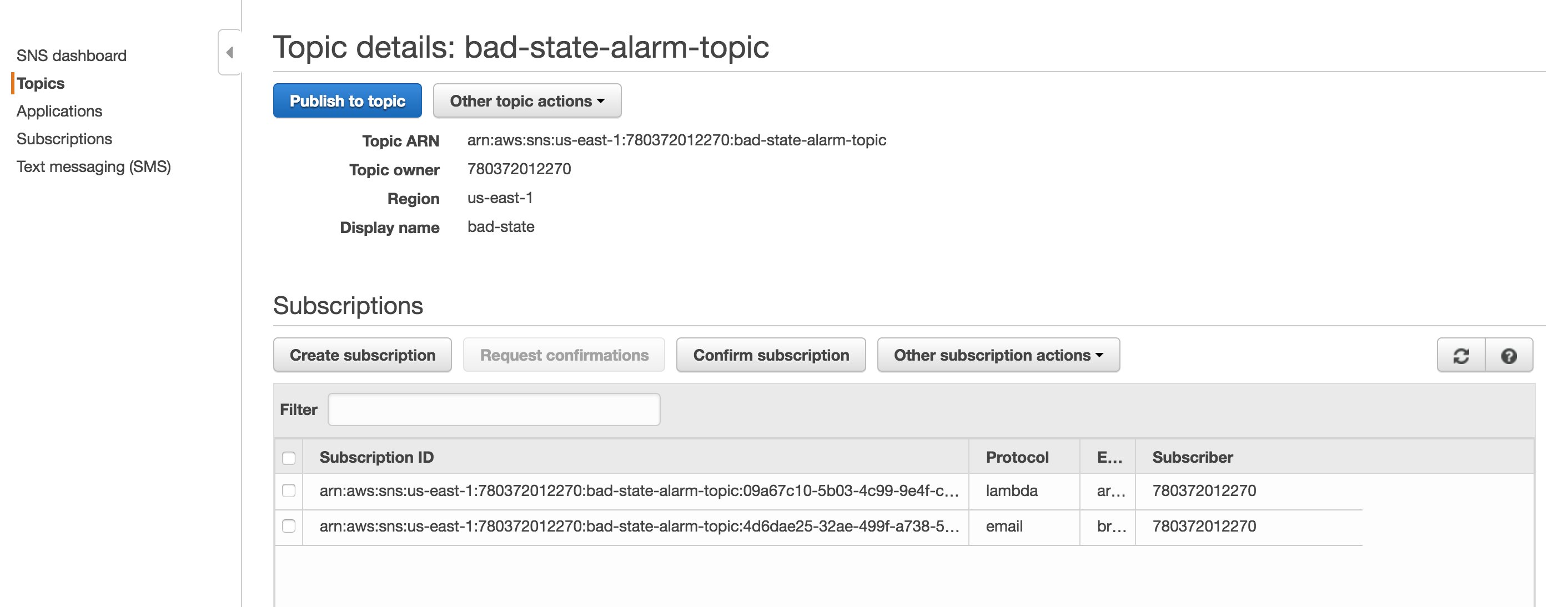
For the magic of automatic failover to occur, we need a lambda function to swap out the target groups and we something to trigger the lambda function. The trigger is going to be a Cloudwatch Alarm that sends a notification to SNS. When the SNS notification is triggered, the lambda function will run. First, you will need an SNS Topic. My screenshot already has the Lambda function already bound, but this will happen automatically as you go through the Lambda function set up. Screenshot of SNS Notification.
Screen Shot 2018-08-15 at 2.21.27 PM

Second, create a Cloudwatch alarm like the one below. Make sure to select the topic configured previously. The Cloudwatch Alarm will trigger when there are less than 1 healthy hosts. Screenshot of the Cloudwatch Alarm [gallery ids="436,437" type="rectangular"] Third, we finally get to configure the Lambda function. You must ensure that your lambda function has sufficient permissions to make updates to the ALB. Below is the JSON for an IAM role that will allow the Lambda function to make updates to any ELB.

{
"Version": "2012-10-17",
"Statement": [
{
"Sid": "VisualEditor0",
"Effect": "Allow",
"Action": "elasticloadbalancing:*",
"Resource": "*"
}
]
}

The code below is intended to be a template and is not the exact working copy. You will have to update the snippet below with the information needed to work on your site.

from __future__ import print_function

import boto3
print('Loading function')
client = boto3.client('elbv2')


def lambda_handler(event, context):
try:
response_80 = client.modify_listener(
# This is the HTTP (port 80) listener
ListenerArn = 'arn:aws:elasticloadbalancing:region:id:listener/app/alb/id/id',
DefaultActions=[
{
'Type': 'forward',
'TargetGroupArn': 'arn:aws:elasticloadbalancing:region:id:targetgroup/id/id'
},
]
)
response_443 = client.modify_listener(
# This is the HTTPS (port 443) listener
ListenerArn='arn:aws:elasticloadbalancing:region:id:listener/app/alb/id/id',
DefaultActions=[
{
'Type': 'forward',
'TargetGroupArn': 'arn:aws:elasticloadbalancing:region:id:targetgroup/id/id'
},
]
)
print(response_443)
print(response_80)
except Exception as error:
print(error)


Screenshot of Lambda function settings. Screen Shot 2018-08-15 at 2.33.56 PM


After putting it all together. When there are less than 1 health target group members associated with the ALB the alarm is triggered and the default target group will be replaced with the alternate backup member. I hope this helps!

Cheers,
BC

Troubleshooting TCP Resets (RSTs)

Inconsistent issues are by far the most difficult to track down. Network inconsistencies are particularly problematic because there can often be many different devices that must be looked into in order to identify the root cause. The following troubleshooting goes through a couple of steps. The first part is to start a tcpdump process that will record TCP RSTs. Then you can send a lot of HTTP requests. Below is the command to issue the tcpdump and fork the process to the background. However, the output will still be sent to the active terminal session because of the trailing &.

sudo tcpdump -i any -n -c 9999 -v 'tcp[tcpflags] & (tcp-rst) != 0 and host www.somesite.com' &

Below is the command to issue lots of HTTP requests. The important part to understand about the below command is to go through the TCP build up and tear down that happens during the HTTP request process.

for i in {1..10000}; do curl -ks https://www.somesite.com/robots.txt > /dev/null ; done

Below is an example of what a potential output could be.

17:16:56.916510 IP (tos 0x0, ttl 62, id 53247, offset 0, flags [none], proto TCP (6), length 40)
10.1.1.1.443 > 192.168.5.5.41015: Flags [R], cksum 0x56b8 (correct), seq 3221469453, win 4425, length 0
17:17:19.683782 IP (tos 0x0, ttl 252, id 59425, offset 0, flags [DF], proto TCP (6), length 101)
10.1.1.1.443 > 192.168.5.5.41015: Flags [R.], cksum 0x564b (correct), seq 3221469453:3221469514, ack 424160941, win 0, length 61 [RST+ BIG-IP: [0x2409a71:704] Flow e]
17:18:54.484701 IP (tos 0x0, ttl 62, id 53247, offset 0, flags [none], proto TCP (6), length 40)
10.1.1.1.443 > 192.168.5.5.41127: Flags [R], cksum 0x46f7 (correct), seq 4198665759, win 4425, length 0

While it may be unclear exactly why the TCP RSTs are happening this does provide a mechanism to reproduce TCP RSTs behaviors to investigate on other devices in the Network traffic flow. Below is documentation on how to troubleshoot TCP RSTs for the F5. 

https://support.f5.com/csp/article/K13223

 Happy troubleshooting!

Grabbing AWS CloudFront IPs with curl and jq

There's times when you want to restrict access to your infrastructure behind CloudFront so that requests must go through the CloudFront CDN instead of your origin directly. Fortunately, AWS lists their public IP ranges in a JSON format in the following link, https://ip-ranges.amazonaws.com/ip-ranges.json. However, there are a lot of services in the above link and it would be very tedious to take the entire JSON and read through it to grab specific CloudFront IP's. Using the combination of command line tools curl and jq we can easily grab just the CloudFront IP ranges to lock down whatever origin that exists. Below is the command that I've used to grab just the CloudFront IP's. Enjoy!

curl https://ip-ranges.amazonaws.com/ip-ranges.json | jq '.prefixes | .[] | select(.service == "CLOUDFRONT") | .ip_prefix'

BC

Decrypt all PFX files in a directory

I recently received a whole bunch of different PFXs where I needed to decrypt the files, extract the keys, and extract the server certificate. Below is Bash script to do just that. Replace the bolded somepass with the real password used to decrypt the PFX and execute the script in the directory with all of the PFX files. Note, the script would only work if the PFX's all have the same password. Enjoy!

for f in *.pfx; 
do 
 pemout="${f}.pem"; 
 keyout="${pemout}.key";
 crtout="${pemout}.crt";
 openssl pkcs12 -in $f -out $pemout -nodes -password pass:somepass; 
 openssl rsa -in $pemout -out $keyout;
 openssl x509 -in $pemout -out $crtout;
done

BC

Demystifying the NGINX Real IP Module

The Real IP module within NGINX is very strict. The purpose of this post is to go over how the NGINX's real_ip_from works by walking through a few examples. Below is the official NGINX document. http://nginx.org/en/docs/http/ngx_http_realip_module.html

Example 1

NGINX configuration.
 set_real_ip_from 0.0.0.0/0 ;
 real_ip_recursive on ;
 real_ip_header x-forwarded-for ;

Source and Destination IP
 src IP = 10.0.0.2
 dst IP = 10.0.0.3

Request
 GET /someurl.html HTTP/1.1
 host: brookscunningham.com
 X-Forwarded-For: 1.1.1.1, 2.2.2.2, 3.3.3.3, 4.4.4.4

The IP 1.1.1.1 would be utilized for the real client IP based on the above request.

Example 2

NGINX configuration. Same configuration as above. Source and Destination IP
 src IP = 10.0.0.2
 dst IP = 10.0.0.3

Request
 GET /someurl.html HTTP/1.1
 host: brookscunnningham.com

The X-Forwarded-For header is missing. NGINX will utilize the layer 3 source IP as the client IP. In this case NGINX will utilize the IP 10.0.0.2 as the real IP.

Example 3

Now lets get tricky and lock down the Real IP Module to a subset of IP's. NGINX Config
set_real_ip_from 10.0.0.0/8 ;
real_ip_recursive on ;
real_ip_header x-forwarded-for ;

Source and Destination IP
src IP = 10.0.0.2
dst IP = 10.0.0.3

HTTP Request
 GET /someurl.html HTTP/1.1
 host: brookscunningham.com
 X-Forwarded-For: 1.1.1.1, 2.2.2.2, 3.3.3.3, 4.4.4.4

NGINX would use the IP 4.4.4.4 as the real client IP in the above request. The reason for this is that NGINX will trust the last IP in the chain of trusted IP's in the designated real IP header.

Example 4

NGINX Config
set_real_ip_from 10.0.0.0/8 ;
set_real_ip_from 4.4.4.4 ;
real_ip_recursive on ;
real_ip_header x-forwarded-for ;

Source and Destination IP
src IP = 10.0.0.2
dst IP = 10.0.0.3

HTTP Request
 GET /someurl.html HTTP/1.1
 host: brookscunningham.com
 X-Forwarded-For: 1.1.1.1, 2.2.2.2, 3.3.3.3, 4.4.4.4

NGINX would use the IP 3.3.3.3 as the real IP since that is 10.0.0.0/8 is trusted and 4.4.4.4 is the last IP in the chain of trusted IP's.

Example 5

NGINX Config
set_real_ip_from 10.0.0.0/8 ;
set_real_ip_from 4.4.4.4 ;
real_ip_recursive off ;
real_ip_header x-forwarded-for ;
Source and Destination IP
src IP = 10.0.0.2
dst IP = 10.0.0.3

HTTP Request
 GET /someurl.html HTTP/1.1
 host: brookscunningham.com
 X-Forwarded-For: 1.1.1.1, 2.2.2.2, 3.3.3.3, 4.4.4.4

NGINX would use the IP 4.4.4.4 as the real IP since the real_ip_recursive is set to off. Only the last IP in the chain of X-Forwarded-For would be utilized for the client IP.  

Example 6 - Internet IPs as source IP

NGINX Config
set_real_ip_from 10.0.0.0/8 ;
set_real_ip_from 4.4.4.4 ;
real_ip_recursive off ;
real_ip_header x-forwarded-for ;

Source and Destination IP
src IP = 55.55.55.55
dst IP = 10.0.0.3

HTTP Request
 GET /someurl.html HTTP/1.1
 host: brookscunningham.com
 X-Forwarded-For: 1.1.1.1, 2.2.2.2, 3.3.3.3, 4.4.4.4

NGINX would 55.55.55.55 as the real client IP. The reason for this is because the source IP address is not defined as trusted within the set_real_ip_from.

Example 7

NGINX Config
set_real_ip_from 10.0.0.0/8 ;
set_real_ip_from 4.4.4.4 ;
set_real_ip_from 55.55.55.55 ;
real_ip_recursive on ;
real_ip_header x-forwarded-for ;

Source and Destination IP
src IP = 55.55.55.55
dst IP = 10.0.0.3

HTTP Request
 GET /someurl.html HTTP/1.1
 host: brookscunningham.com
 X-Forwarded-For: 1.1.1.1, 2.2.2.2, 3.3.3.3, 4.4.4.4

NGINX would 3.3.3.3 as the real client IP. The reason for this is because real_ip_recursive is set to on and the source IP address is now defined as trusted within the set_real_ip_from up to 4.4.4.4.

Remote Wireshark and tcpdump

This may come to a surprise to many people, but sometimes computers do not talk to each other the correctly. Luckily, packets don't lie. We can easily find out which computer is not communicating properly using either tcpdump and/or Wireshark. Below are by far the 2 most useful network analysis commands that I use.

Print only the HTTP header information

The following command is usefully when you only need to look at the HTTP headers, provided you are analyzing cleartext HTTP traffic.
sudo tcpdump -i any -A -s 10240 '(port 80) and (((ip[2:2] - ((ip[0]&0xf)<<2)) - ((tcp[12]&0xf0)>>2)) != 0)' and not host 127.0.0.1 | egrep --line-buffered "^........(GET |HTTP\/|POST |HEAD )|^[A-Za-z0-9-]+: " | sed -r 's/^........(GET |HTTP\/|POST |HEAD )/\n\1/g'

Wireshark to a remote host

For more in-depth protocol analysis, it may be necessary to leverage Wireshark. The command below is super useful to pipe the tcpdump output from a remote machine to your local instantiation of Wireshark. This way you don't have to take a capture, save it locally, and then open up Wireshark. Below is the command that is needed.
ssh ubuntu@ -p 22 -i ~/sshpemkeyauth.key "sudo tcpdump -s 0 -U -n -w - -i any not port 22" | wireshark -k -i - &
You can make it into a bash function like I have below as well.
function wiresh {
 ssh ubuntu@$1 -p 22 -i ~/sshpemkeyauth.key "sudo tcpdump -s 0 -U -n -w - -i any not port 22" | wireshark -k -i - &
 }
This way you only have to do the following at the command line to take a remote wireshark capture:
wiresh 
I hope this helps anyone else out there. I have to give a shout out to StackOverflow for inspiring this post. BC

Basecamp 2 RSS Feed and Slack Integration

Abstract

The purpose of this post is to demonstrate how Basecamp updates can be automatically pulled into a Slack channel.

Pre-reqs

Before going any further, the following assumptions must be satisfied.
  1. IFTTT must be integrated into your Slack team.
  2. The Slack channel that will receive the Basecamp updates must be a public Slack channel.

Identify the Problem

Slack and Basecamp are both awesome tools in their own right, and both have a distinct purpose for successful project execution. Slack is great for real time troubleshooting and communication when a conference call is not necessary. Whereas Basecamp is great for task management and big picture tracking. What I have found while using both tools independently is that Basecamp can quickly be forgotten in favor of strictly Slack and email communication. This is typically a non-issue for small projects with very few moving parts, but as projects become larger with more teams involved it becomes even more important to keep track of tasks independently through Basecamp. To keep everyone on track and focused on their respective tasks the two tools need to be merged.

Fix the Problem

The solution to this problem is to pull Basecamp updates into Slack by using IFTTT (https://ifttt.com/). Basecamp 2 supports RSS feeds that are automatically updated when something new happens within a Basecamp project. See the link below for details.

https://basecamp.com/help/2/guides/projects/progress#rss-feeds

IFTTT can be used to pull updates from RSS feeds and post new updates into Basecamp. The link below will take you right to the If This portion of the IFTTT applet.

https://ifttt.com/create/if-new-feed-item?sid=3

Now here is where authentication comes into play and things are a bit trickier as the following links from StackOverflow will articulate.

http://stackoverflow.com/questions/2100979/how-to-authenticate-an-rss-feed

http://stackoverflow.com/questions/920003/is-it-possible-to-use-authentication-in-rss-feeds-using-php

A lot of RSS feeds are accessed via an unauthenticated means. However, Basecamp (thankfully) protects project RSS feeds so that not just anybody can view your project details. To authenticate against an RSS feed, the URL must be constructed in the following manner.

https://username:password@basecamp.com//projects/.atom

The  and  pieces of the above URL will be specific to your specific Basecamp identifiers. The username and password will be your username and password that you can use to access Basecamp. Since this is a URL that is used to access the RSS feed, then your username may need to be modified. I'll use the following email as an example.

zergrush@allyourbase.com

The ampersand (@) must be URL encoded when used for the RSS feed. The following is example of a properly constructed Basecamp URL.

https://zergrush%40allyourbase.com:password1234@basecamp.com/9999999/projects/99999999.atom

You can validate that the URL should work by copy/pasting it in your browser. If you do not see an RSS feed, then check to make sure that any other special characters in your username or password are encoded properly. Below is my favorite site for URL encoding and decoding.

http://meyerweb.com/eric/tools/dencoder/

If IFTTT accepts the RSS feed URL, then  congrats! The hard part is over. You can then select Slack for the Then That action and use the Post to Channel option. One thing to note, is that the Slack channel must be a public channel for this integration to work. You can also customize how the RSS message is sent to Slack within the IFTTT settings. That's all there is to it. Test by doing anything on the Basecamp project associated with the RSS feed you configured, and then Slack should reflect the update in about 5 - 10 min. I hope anyone reading has found this article beneficial. Let me know in the comments below if you have any questions! Thanks, Brooks

How to use Mitmproxy and Ettercap together on OS X El Capitan

Abstract.

The purpose of this document is to provide guidance on how to configure both of the tools mitmproxy and ettercap to work together to monitor mobile application traffic. This document is intended for educational purposes. Using the techniques here with malicious intent may result in criminal consequences. Before going any further, I want to  point out one of the better quotes that I have seen in a man file :-). Below can be found in the man file of ettercap.

"Programming  today  is  a  race between software engineers striving to build bigger and better idiot-proof programs, and the Universe trying to produce bigger and better idiots. So far, the Universe is winning." - Rich Cook

Install ettercap

Homebrew is amazing. Ettercap is as easy to install as issuing the following command.

brew install ettercap

Install mitmproxy

The docs for mitmproxy are fairly straightforward. Mitmproxy is a python package that runs on Python 2.7. The link below has the official documentation. http://docs.mitmproxy.org/en/latest/install.html#installation-on-mac-os-x

Configure Port Forwarding

First enable IP forwarding. This is outlined in the transparent proxy guide in the following link,. http://docs.mitmproxy.org/en/latest/transparent/osx.html.

sudo sysctl -w net.inet.ip.forwarding=1

Brian John does an excellent job explaining the new port configuration that needs to occur for OS X Mountain Lion. See the link below for his guide. http://blog.brianjohn.com/forwarding-ports-in-os-x-el-capitan.html I will go through the steps necessary for mitmproxy to work as expected based on the information that Brian John provided.

Create the anchor file.

/etc/pf.anchors/mitm.pf

Add the following lines to the anchor file, mitm.pf.

rdr pass on en0 inet proto tcp from any to any port 80 -> 127.0.0.1 port 8080

rdr pass on en0 inet proto tcp from any to any port 443 -> 127.0.0.1 port 8080

Create the pfctl config file.

/etc/pf-mitm.conf

Add the following lines to the pfctl config file.

rdr-anchor "forwarding" load anchor "forwarding" from "/etc/pf.anchors/mitm.pf"

Enable or Disable Port Forwarding.

To activate or deactivate port forwarding, use one of the following commands.

Enable.

sudo pfctl -ef /etc/pf-mitm.conf

Disable.

sudo pfctl -df /etc/pf-mitm.conf

Combining the tools.

Now that port forwarding is now configured, fire up mitmproxy with the following command.

python2.7 mitmproxy -T --host

mitmproxy will by default listen for incoming HTTP and HTTPS traffic on the proxy port 8080. Next, use the following command to start ARP spoofing the target device.

sudo ettercap -T -M arp:remote ///80,443/ ////

The final command should look something like the following.

sudo ettercap -T -M arp:remote /192.168.0.1//80,443/ /192.168.1.54///

You will need to trust the mitmproxy CA if you would like to inspect HTTPS traffic. The steps for this configuration can be found in the following link, http://docs.mitmproxy.org/en/latest/certinstall.html.   Once mitmproxy and ettercap are both running, then you should be start seeing network traffic from your mobile device on your OS X device. Good Luck with inspecting traffic! Let us know in the comments below if you have any questions or feedback on this article. Brooks